Quick Update and a bit of lore

Don’t have much to report (no images or anything), but wanted to indicate that there is still progress being made. Mostly backend code and fixing collisions as items fall down when chopping trees. I also wanted to go over 6 questions to ask when making a story. This apparently works with video games as well. Let’s go over that a bit. Link below on the video I got that from. It’s 6 question that if you answer them, you can write any story.

Here is the link to the video:

https://www.youtube.com/watch?v=uL0atQFZzL8

The 6 questions are:

  1. Who is it about?
  2. What did they want?
  3. Why can’t they get it?
  4. What did they do about it?
  5. Why doesn’t that work?
  6. How does it end?

The premise is that there was a conflict or war between humans. Some AI were involved and reprogrammed.  But most robots did not get involved directly and do not harm anyone unless they have a really good reason. So your task as the player is to go from island to island to clean up and organize robots that were left behind. Some will help you. Others are leftover from the conflict and will want to harm you. You must build up and defeat those that would fight against you until you reach victory. But you must build up in buildings, technology and monuments to prove your worth where the robots will fight for you. Once you’ve claimed the entire island, the robots will vote if they want to stay or return home. The more robots stay, this will indicate how appealing your settlement is and will mean a better score.

Hover over this text for spoiler about who you play

To answer the questions more directly:

  1. Stranded robots on an island after a conflict
  2. To go back to normal helping build a community
  3. They’ve lost their leaders or anyone to help and are stuck on an island. (This is where the player comes in)
  4. Nothing. This is where the player takes over and gives them purpose. The robots will actually do most everything without telling them.
  5. They’re not working together at first and if they do, the bad robots will attack. You need to find resources, build up and build defenses, etc.
  6. When you take over the island.

I haven’t fully decided on the end. Much of this may change. But that’s the premise right now.

As for updates, things were a bit slow for a while. I still don’t have the treecutter done. I have one thing remaining. To place the carried item on the ground at the correct location in the correct tile. Items will stack and I’ve set a current limit of 6. So 3 on the bottom, the 2 above that and 1 at the top. But I need a way to automatically tell the size of the item and if it’s a circular item or not (like a log). Logs stack differently. So I’ll likely do that today. I also slowed down the animations. At one point he was removing the center of the tree before the top of the tree fell down.

Once placing items is done, the tree cutter is done, the carrier will need a bit of code to handle priority items and then do some design decisions on what a carrier should pick up next. Should it be random? Nearby? I think the item should be somewhat nearby otherwise, it would waste a lot of time. I will also have to handle collision between carriers. Waiting is one option, but that could lead to deadlocks. Also, if someone plonks a building right in the path of a carrier, I need to update that path. The next big resource is the rock cutter. I intend to reuse a lot of the same code for this. I can now move robots around where I want and do fine adjustments with no hassle now.

Then I need a UI to at least place where a building should be built. Then the user can actually play a game or the start of one. In any case, the core mechanics are coming along. I may start posting youtube videos or shorts and linking them here to show some progress. The tree falling animation would have been funny to post.

That’s it for now.

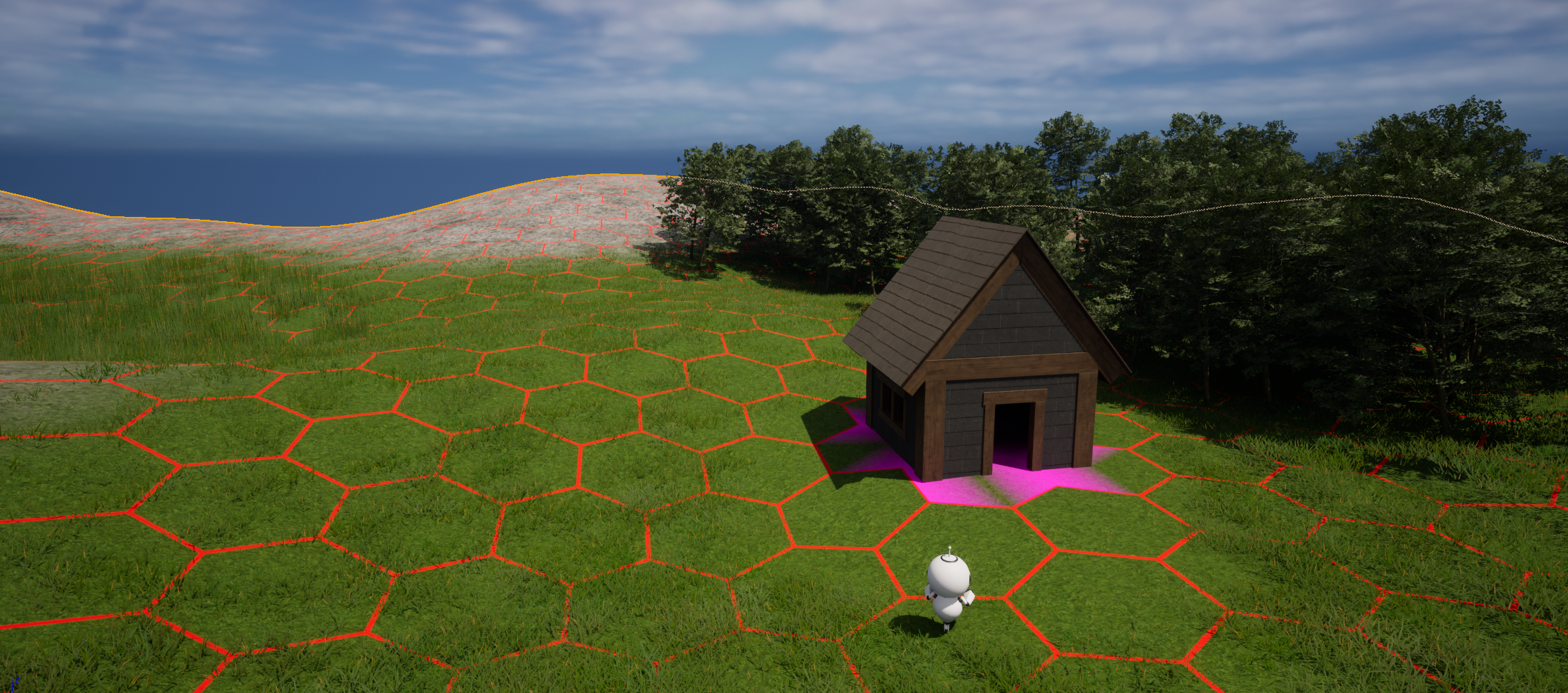
I may as well add one image. Here’s a building I made a while back that is actually hundreds of parts (so the robots can build it one piece at a time). There is a lot done that I haven’t shown yet. The purple is a custom shader to indicate that my code is seeing the building where it actually is. This means you can place pre-built buildings at level start and the code will automatically recognize where they are and update the pathfinding code to go around it as well as set the input and output tiles for resources for the building.

Inverse Kinematics

We’re going to go over IK chains mostly so I’ll have a reference for what I did. This may get a little bit into some technical details, but hopefully not too bad.

First, what is Inverse Kinematics? It’s simply trying to move a limb and have other limbs up to the torso move with it. So if you move someone’s foot, their leg (calves and thighs) will move as well. For now, we’ll only look at two bone IK. What I was struggling with was trying to move the robot’s hand and have the arm follow it.

Before getting to all that, there’s this thing in Unreal Engine called a control rig. What it is are widgets you can place around your character to move different parts and easily create character animations. Some can be for the eyes. Others can be for the head where the head will always follow a widget that you can move around. Makes it easy for your character to look at a specific target. One aspect of this rig would be to move the legs and arms. And that’s where IK comes in.

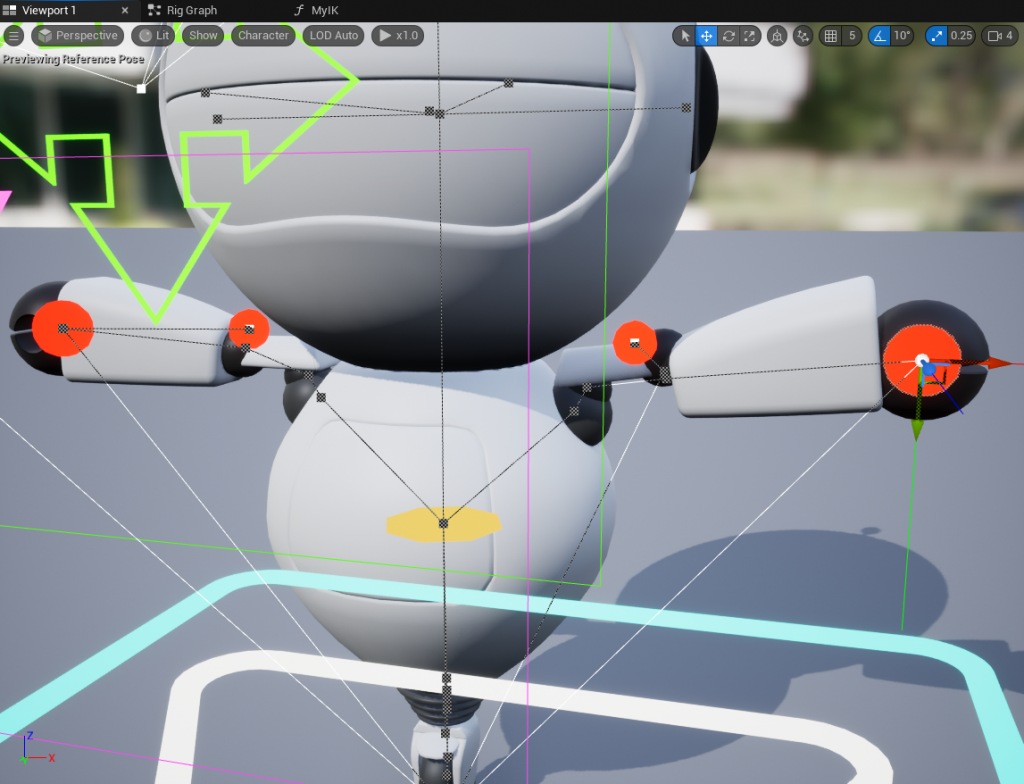
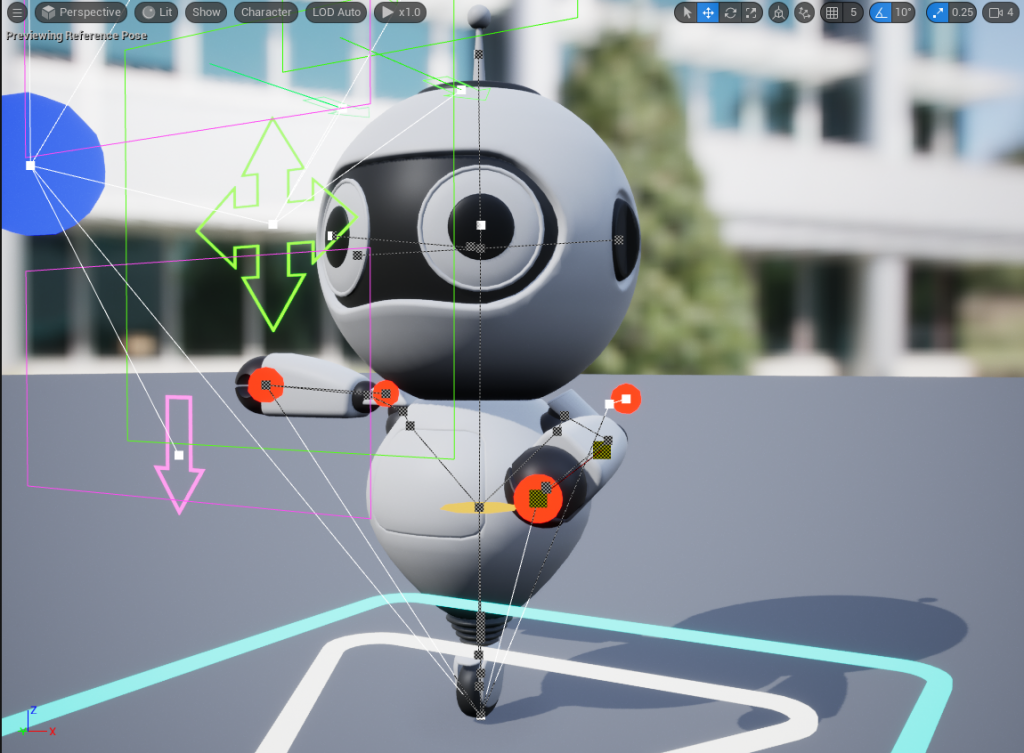
So if you move a control rig widget for the hand, you’d like the arm to follow. That’s it. You should be able to plug in a two bone IK component that comes with Unreal Engine and be done with it. Instead, this is what I got.

The image is a little busy, but the red circles are control rig widgets (as are the arrows). If you move the red circle on the hand, the arms should bend in to make room. There’s a widget for the elbow, but it’s not on the elbow itself. It’s behind it to tell the IK component in what direction to move the elbow.

Ok, so what’s going on here? The arm on the left of the image is not hooked up yet. It’s in the default T pose. The right side (left arm) is hooked up and notice anything strange? The forearm is rotated in place. The elbow is too far up and the hand is too far low. Basically, an offset has been applied and I have no idea why. I have used IK chains for many years. I know how to hook them up. I’ve used them before in Unreal Engine. This is very old hat for me. And it just gets worse if you try to move the arm. Sometimes the hand completely detaches from the body. Sometimes the arms go backwards. It’s ugly. I’ve tried all sorts of things and nothing. I did fix it, but not using an IK component that directly modify the bones’ transforms.

Let’s take a little break and change the topic a bit. I needed this because I wanted to implement the backwards transform for the control rig so I could make animations to chop trees. Forward transform is what I described above with the control rig. Reverse transform is so if you have an existing animation, it can be applied to the control rig so that you can edit and modify said pre-existing animation. I didn’t have the reverse transform set up, but when I did try to set it up, I noticed something was off with the arm and here we are.

As for the game, I’ve finished the asset management for foliage (trees, grass, flowers). I can swap out the foliage instance for an individual actor so that I can chop it down. There’s still plenty to do under the hood, but buildings automatically get assigned a worker. They can find their way to said building. They will enter it and they will perform the task for that building. In this case, I’m trying to get the treecutter to chop down some trees. He now exits the building and goes to the tree and is ready to chop it down. But I ended up down this rabbit hole trying to make some simple animations. He already has a blade. I just need to extend it, make a sweeping motion and let the tree fall. That’s it. I could have done it manually by tweaking individual bones, but no, I wanted a working control rig.

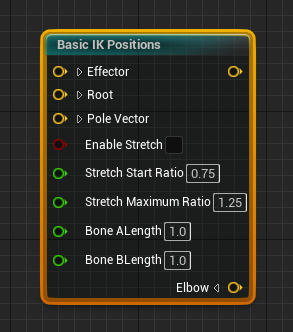
So how did I fix this? Since I have no idea why this is happening, I needed a different way to accomplish this. I know IK tools work. So I noticed unreal actually does have a really simple component that only takes 3 positions for IK. Normally, you need 5 (the elbow and hand control positions indicating where you want to move the arm). So how does this work?

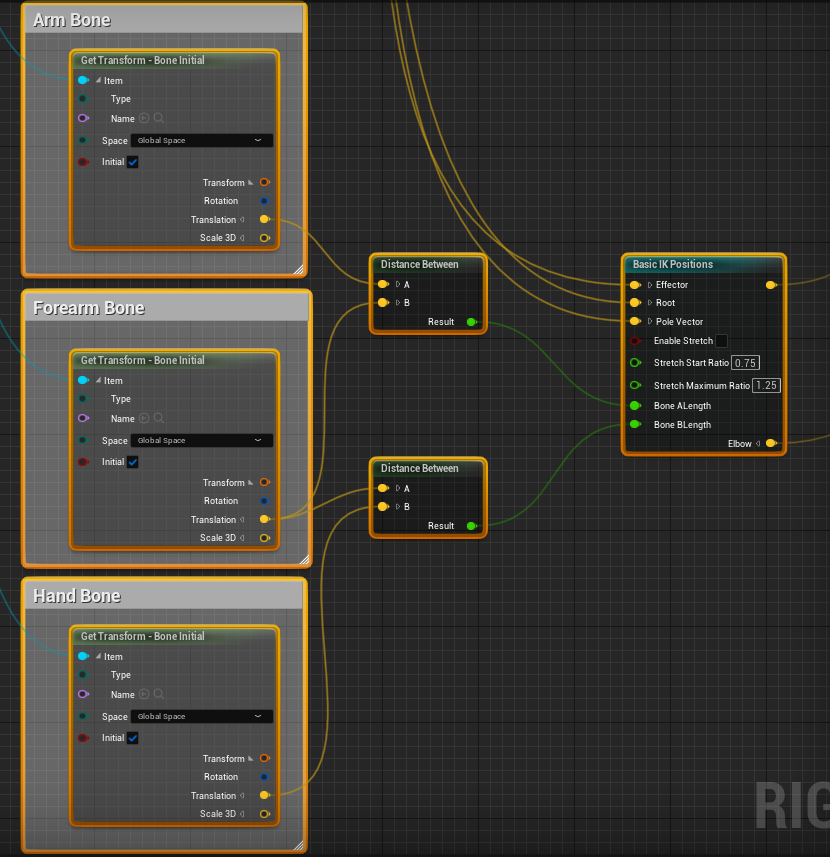
The trick is to notice the last two input pins. The Effector is where you want the hand to go. So this is the hand rig control position. The root is the first of the two bones. In this case, it is the location of the top of the arm (shoulder area). The pole vector is the direction that the elbow should go. So this is the elbow rig control position. Then you calculate the bone lengths in their original T pose. There are components to do this, so you just plug it in.

Notice the “Initial” pin. This is their starting position in the T pose. So you can calculate the original bone lengths avoiding any distortions. And they plug directly into the IK components. Easy!

Notice also that we DON’T use these transforms for the input of the IK component. We want the current position for those.

For debugging, I displayed the elbow and hand locations of where the IK component computed them. The positions are exactly where they should be. Now to move the arms.

I chose this Basic IK Positions component specifically because it did not alter the skeleton or bones of my character. Problem is we have to do that ourselves. This is surprisingly easy. I just used a couple of “Aim” components that come with Unreal Engine.

Aiming takes a bone that should be pointing at a certain target. It takes said target as input as well. And it has a secondary target because it needs to know what the “up” direction is for rotating laterally. So the input bones and targets are easy. It’s the upper arm and forearm bones respectively. And for the targets, they are the outputs from the IK component. That only leaves the secondary or “up” targets. For the upper arm, I just used a perpendicular vector from the triangle formed with the upper arm and the elbow control rig position. This is done by taking two vectors and taking the cross product. For the lower arm, I used the triangle of the upper arm and lower arm.

I put all this in a blueprint function so I can reuse it and this is what I get.

The arm looks like it should. I can move it around by moving the red circle on the hand and the elbow goes where it should. I also used the other controls to open the eyelids and set the pupil size just to show how this works. It’s a little busy, but it’s very flexible.

The next problem I have is the reverse transform. Taking the bone positions of the arm and placing the controls of the control rig in the correct location so that the arm remains in the same location. I’m not sure how to do that. That’s the next challenge. I was just happy to get this really annoying problem solved and thought I’d share the results. And again, this is why I chose a robot with no legs. I just didn’t want to deal with the animations and robots’ movements don’t need to look human. Even so, still not without its problems 🙂

Oh, forgot to mention a really nice bonus to my fix. In all existing implementations that rotate the bones for you, the hand would not rotate with the forearm and would look really weird on the robot when his hand is not aligned with the forearm. I think this is done so that when you move the foot for example, the foot stays aligned with the floor. But in my case, I don’t want this and just rotating the forearm rotates all the child bones automatically.

Chopping Trees

This will be a very short post. I’m currently working on being able to chop trees. This is probably the most difficult part of the game to develop. I have to cut the tree, remove the branches, cut the logs, bring them back to the cabin. And I have to make sure the tree falls down in the right direction. I’ve already cut up two trees (in 3d software). I may add a third tree, but it’s an insane amount of work. So for now, there are only two variations of trees (I have a total of 5). Oh, and the tree planter needs to be able to plant and grow trees. Those are available in the Megascan trees made available by Epic.

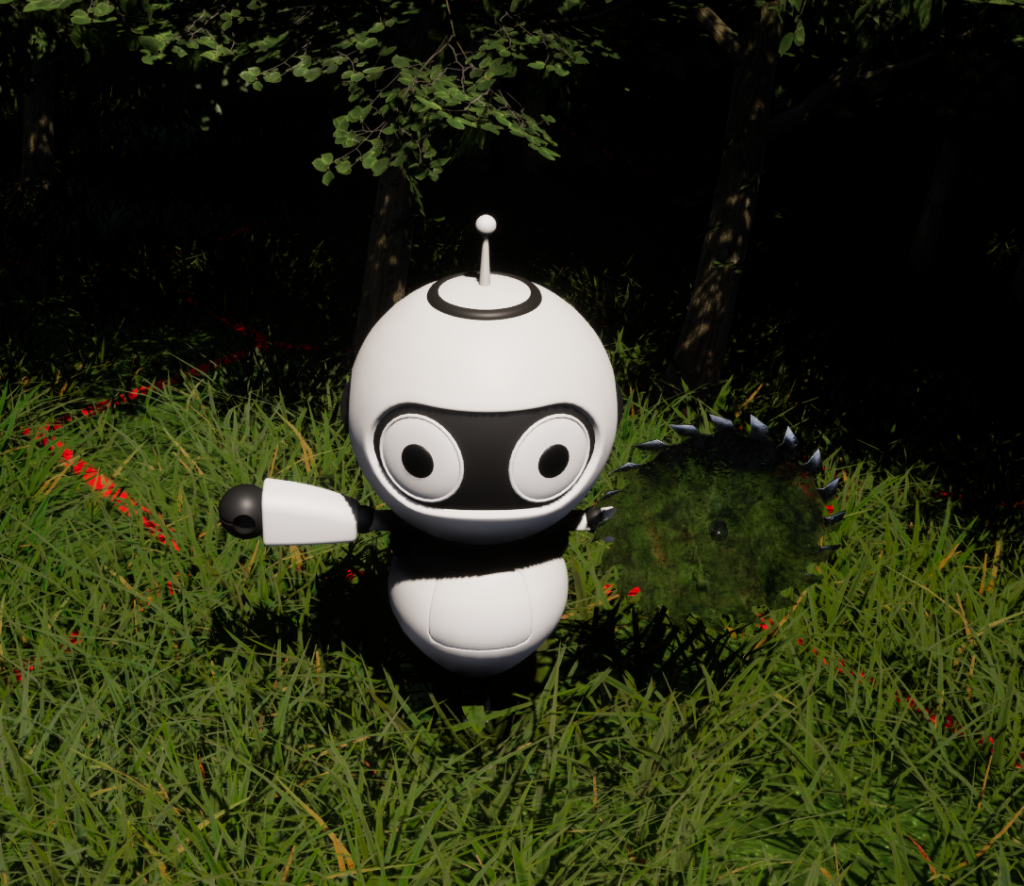
But first, we need a saw to cut down the trees. And yes, the trees he’s going to chop down are the ones behind him in the image below.

No axe or hand saws for this guy. Built-in portable circular saw. Instantly cuts trees down. A few challenges here. I’m going to have to disable collisions with trees so the robot can get in the forest. Otherwise, this isn’t going to work. And I’m going to have to ignore a lot of stuff that may be around the tree if it falls in an unusual spot. I don’t really have a choice. So next step is doing the animations and I may do them in all in C++ instead of in the editor because I need to ensure everything lines up properly. I mean, I don’t have to. But it’d look a lot nicer.

This is one of the main resources in the game (planks from logs), so this is a big milestone in the game. All the assets are ready to go for cutting down trees. Just got done the saw and adding skeleton sockets to attach the saw. The other two big milestones are carrying resources from one place to another and stacking them (and taking the top one), and figuring out conflicts if more than one robot is picking stuff up from the same tile. And lastly, being able to construct buildings. If I can get those three things done, that will be the core mechanic of the game in place and the rest is details.

Level of Detail

This is jumping ahead a bit, but we’ll talk about LOD’s (level of detail). When the camera is up close to a 3D model, you want the highest resolution model available that can be supported by the game. But as you zoom out, you can’t see much of the small details anymore, so you want a simpler mesh. There are automatic tools that will do this. This process is called decimation. In Unreal Engine, you can set how small the character is on screen before switching to a different level of detail (a coarser mesh). You can then set the percentage of polygons you want from the original when creating each LOD. Usually each LOD is 50% of the polygons of the previous. So if you start with 24K triangles, LOD 1 will have 12K, LOD 2 will have 6K and so on. Usually, 3 to 5 LODs are created. But Unreal Engine supports up to 8. You want to use more LOD’s the more polygons your mesh has.

The reasons for building LOD’s are numerous. First is that you want to have your video card do less work if possible. In this game, I’m going to have many characters (robots) running around. If they each have 50K polygons, the game isn’t going to run very smoothly. And to fit them all on screen, you’re going to have to be zoomed out anyhow. So drawing 8x small meshes at LOD 3 is the same work as drawing one highly detailed mesh (LOD 0).

So let’s start with the little guy in the game.
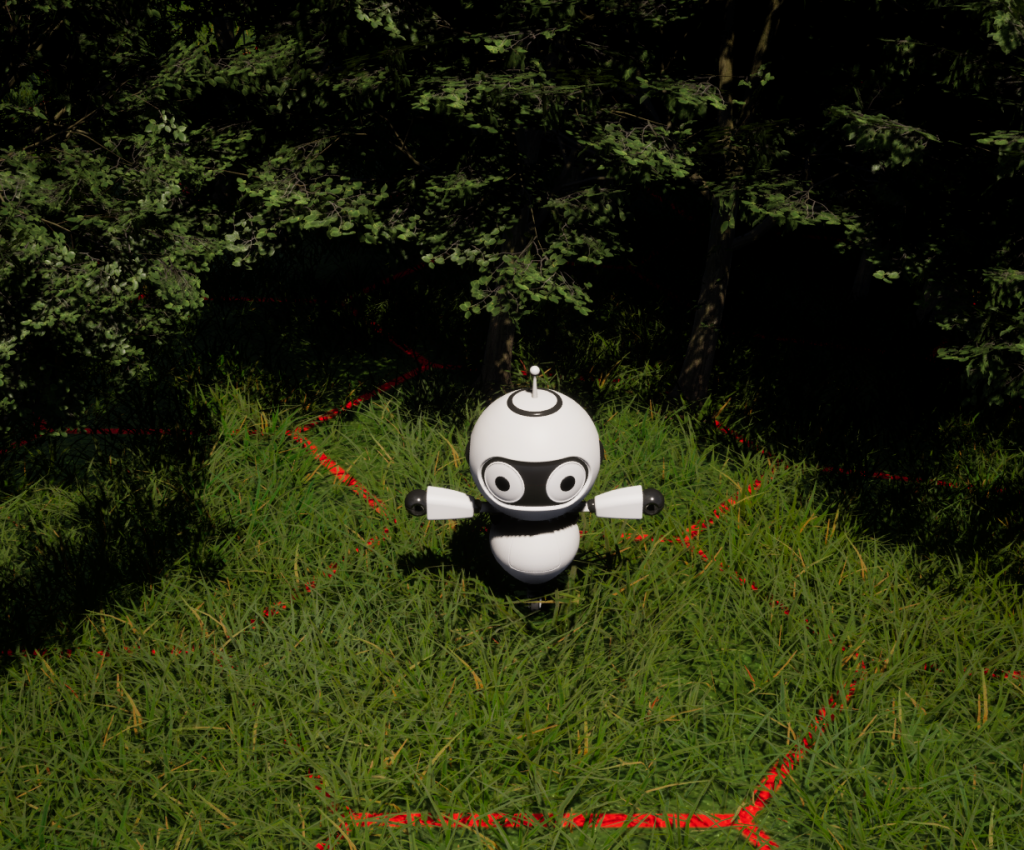
This robot is licensed asset found at DAZ 3D. I did not create it. The trees and grass are free on Unreal Engine’s Epic store. The little robot will push the grass away from him a little when he moves around. The red hex lines are just an indicator where the tiles are located. I may remove them or make them an option. There are actually 6 pie slices in each hex tile for roads, buildings, resources, etc. So it’s not fixed strictly on hex tiles. Sub-tiles can be used in the game.

The reasons to use a robot for this game are:

  1. Save time creating an asset
  2. Don’t need to worry about leg animations
  3. Skinning weight maps are really simple compared to live figures (these tell what polygons to move when a bone moves).
  4. Starting over isn’t a big deal and since this is my first project, I expect to do that several times.

Let’s take a look what what auto generated LODs look like.
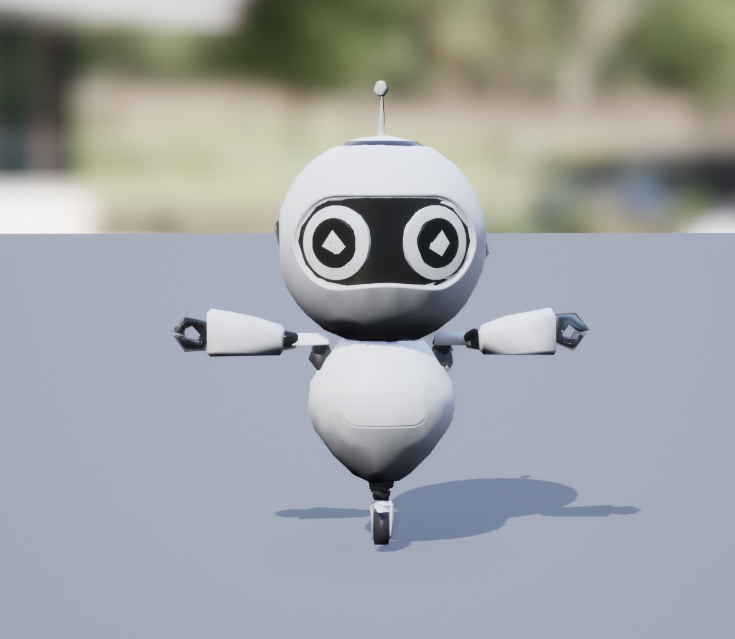
This is LOD 3 so you would never see it up close like this. The arms and rest of the body are actually fine. But the distinct feature of this robot are its eyes. And as we can see here, the eyes are all messed up. The whites of the eyes are poking through the pupil and this is very noticeable, especially considering the contrast of black and white. And this isn’t a criticism of Unreal Engine’s decimator. It’s actually quite good. I find it’s one of the best out there. It’s just that the eyes are where there are a lot of overlapping polygons. The robot also has eyelids that cover the entire eye area and this has pokethrough as well. In other LODs, it’s actually the whites of the eyes that have blacks from the mesh behind it poking through. Anywhere you have overlapping polygons, you’re going to have these kinds of issues.

So one fix is to just export the model, fix up the eyes and re-import it. It’s not that simple though. You need software that can retain the rigging, weight maps and UV maps (texturing). There are options in Unreal to only import the geometry, but I have no idea what happens to the UVs and weight maps in such a case. And in my experience, it will still complain about the rigging if the weight maps or skeleton isn’t imported back.

A nice feature about LOD’s in Unreal Engine is that each LOD is a distinct model. You can remove bones if they are too small or not used anymore. You can have different UVs and different weight maps. Sometimes, there are parts of a model that become so small, you just delete it. So those UVs are gone and so are its materials. This is one less draw call.

I use Lightwave 3D for modelling. It doesn’t support rigging though. So what I do is import the FBX file into Lightwave’s Layout software (for animations) and here I can send the model to Modeler to edit the figure and then send it back and export it back. The bone structure is somewhat different than Unreal. You have to rename all the end bones and configure it a specific way. But it lets you export it back to FBX with full rigging, weight maps, UV maps and everything. I do keep Blender in my back pocket as a fallback if all else fails.

So… with all that said, did I just fix the eyes and call it a day? 🙂

NO!

I made every single LOD by hand.

I wanted to get more practice out of the tools I was using and I love doing this stuff, so no big deal. When making LOD’s yourself, I learned one very important lesson. Keep everything you can as quads. Do NOT triangulate your mesh. Unreal Engine will convert everything to triangles, but if you want to make your life simpler, keep everything as quads where possible on the assets you work with outside of Unreal (before importing to Unreal). Why? Because if you have a mesh of quads, you’ll most often have them in a grid arrangement. If you have a section where you have a 2×2 region of quads, remove the middle horizontal edges and you’re left with two quads. Instantly reduced your mesh by 2. Do it again vertically and your mesh has been reduced by 4 from the original. You only need to fix up the areas that join up to different shapes. You can repeat this again and again until you run out of polygons. You can’t do any of this with triangles.
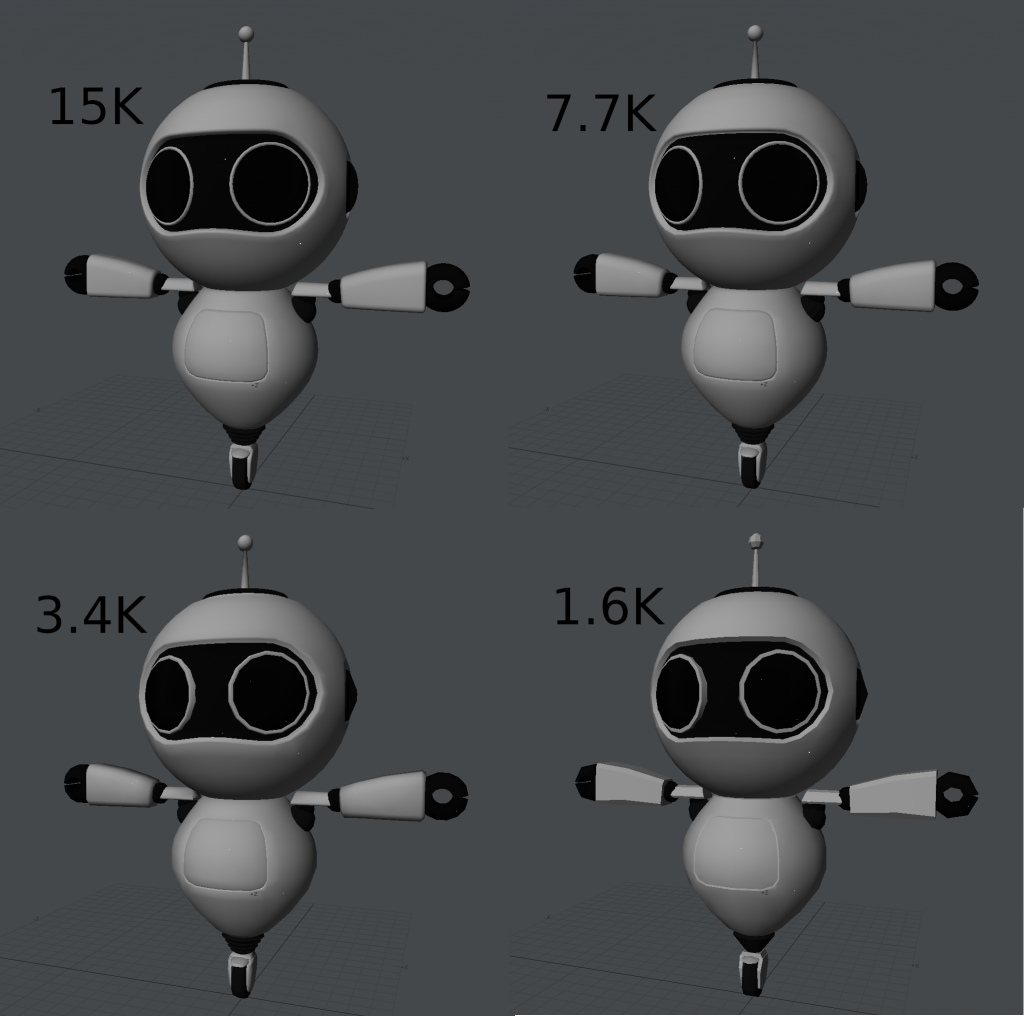
Above are LODs 0 to 3. I was somewhat surprised at how good LOD 1 looked. I may end up using it as the main mesh. Haven’t decided yet. By LOD 2 (3.4K) you can start to see degradation. And this was manually and intentionally done. When zoomed out, the eye appear perfectly circular. You really can’t tell the difference. In Unreal Engine, you can zoom out and select which LOD you want to look at so you can pick the exact screen size that the LOD will be used at.

One thing I noticed is that assets that aren’t made for games often don’t care about how many polygons they use. In this case, I simplified the ears. Originally, they had 4340 quads. I reduced it to 1200 (600 each ear). Even that was a bit much I think. Again, this is no criticism of the original artist. These assets are made for detail.

Another issue with third party assets is that often the mesh is in separate parts. IOW, sections are copy and pasted (often scaled) but not joined together. Why does this matter? Again, it’s no problem if you’re just rendering these assets. But in a game where you need to make LOD’s you can’t decimate these meshes properly. In this example, the black rubber triangular section above the wheel was 4 different sections. When decimating, it would distort or just plain disappear. Even doing it manually, it limits what edges and polygons you can remove. In LOD3 for example, I made it into a single section with only 24 polygons. Before using even the original mesh, some adjustments are needed. There was an antenna on the bottom with some ring structures. I’m guessing for a levitating robot. I’m never going to use that, so I just removed it entirely. The door on the belly was just decorations. I’m actually going to put a battery in there that will have a function in the game. So I cut out the door and added a cavity section in the torso to store the battery. I also modelled a battery that will go in there. I added UV’s for the internal section, added weight maps and added a new bone to the skeleton so that the door can open.
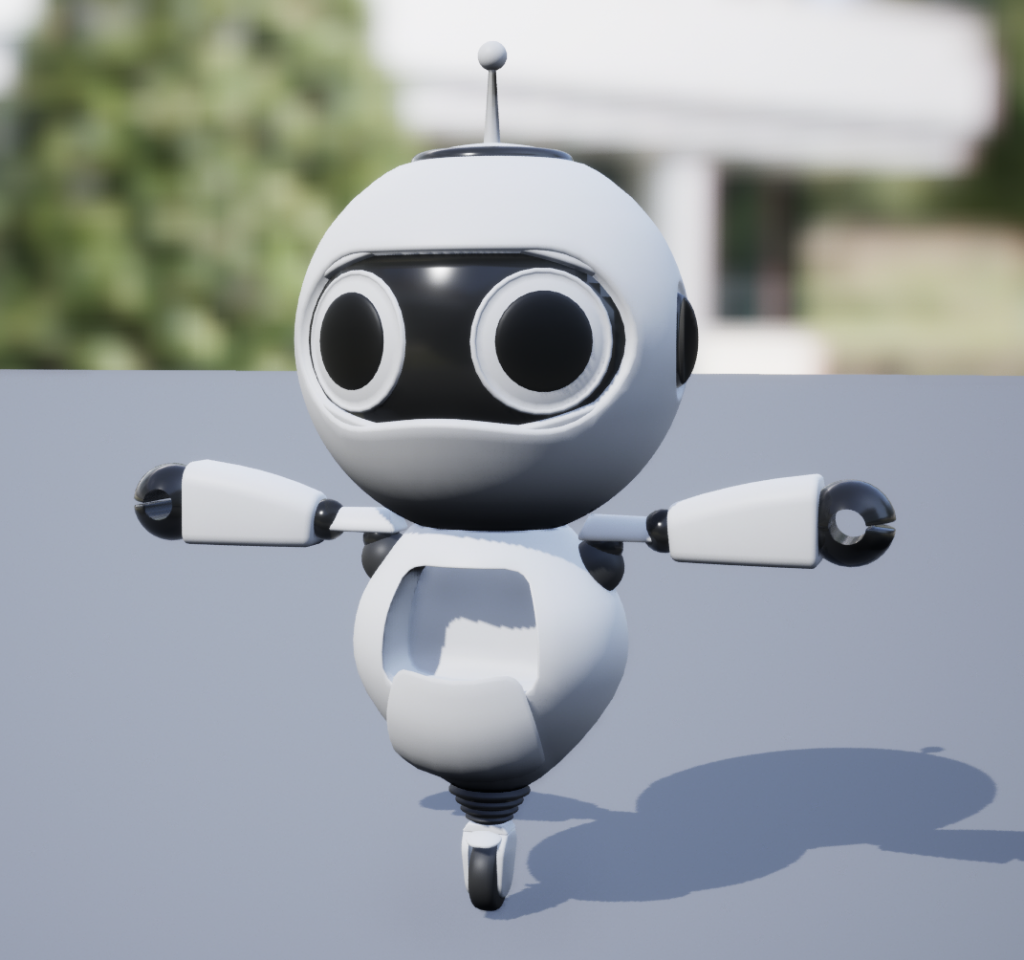
I may end up adding LOD 4 and 5. I’m at the limit of what I can manually remove, so I may let Unreal’s decimator take care of it and manually fix the eyes as mentioned earlier. One reason for doing at least the first two LODs is that if I decide to use LOD 1 or LOD 2 as the main mesh (it will become LOD 0) or even doing it dynamically in game for older machines, I know those LOD’s will look good. The other LOD’s aren’t as important since they will never be seen up close.

Is this the correct way to do it? I have no idea. But it was FUN!!! I find I can do at least two LODs per day. And the door enclosure and battery took another day.

As for the next entry, it might be about Megascan trees and assets and what I did to be able to chop down trees. This is a resource management game, so a tree cutter hut will have a robot in it. He will chop down trees. Another robot will bring the logs to the saw mill where another robot will saw them into planks. With planks and stones, you can build basic buildings (like said tree cutter hut and sawmill). There’s a list of resources and buildings that I’ve yet to finalize. Chopping down trees was by far the most difficult challenge. Another topic would be A* pathfinding in Unreal. That’s where the hex tiles come in. That was fun.